Large applications
As you build applications in Agilebase, you will quickly find yourself creating views as this section of the documentation describes.
Each view serves a purpose, to help individual people carry out their daily work. They support many functions from just creating lists of items to work through, through to more complex things like maths, calculating resource utilisations or stats for management reports.
As an application grows in size, you will naturally start to want to make the output of one view feed into another.
A good example is a recipe development application. As each ingredient is assigned an amount in grams, a view can calculate the total for the recipe, then the percentage figure for each line. The percentage can be used for many purposes, for example
- scaling a recipe to make large amounts
- calculating the nutritional value of the recipe as a whole, given the values of each ingredient
- working out the raw material costs of producing any amount, given the cost/g of each constituent
- generating an ingredient declaration, to be included on packaging
As it happens, we have an example of a recipe generation app, as part of a wider set of tools for food manufacturers, built on Agilebase.
Here’s a diagram which shows the number of views which the ‘product ing. weight total’ view feeds into
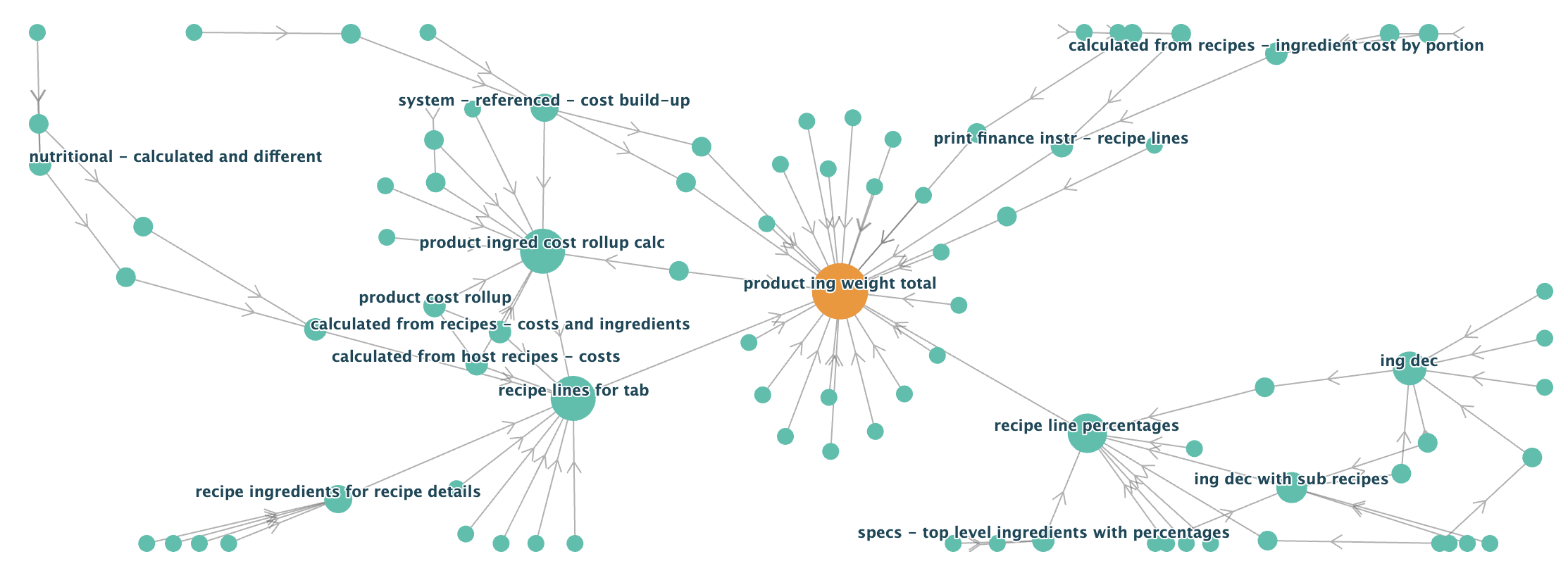
Each node is a view and the lines are connections (i.e. joins or unions) between them. In this case, 84 views depend on the weight total. You can see that there are chains of views, where one view joins to another, which joins to another etc.
The interesting thing is that this tactic would actually be frowned upon in traditional database development. There’s an excellent writeup of some of the costs associated with the tactic here:
https://boringsql.com/posts/strong-views/
This ability of views to encapsulate and re-use logic is so useful and powerful though, that we’ve put a lot of work into mitigating all the downsides and making it work well in practice.
In fact, speaking personally for a moment, this is the part of Agilebase which I’m most proud of, as a designer and developer of the platform. We often say that Agilebase is different to many other No Code or AI platforms in that it allows very complex yet robust applications to be built. An large factor is that we allow the full potential of the underlying PostgreSQL database to be utilised, by adding this ability to build up business logic layer by layer.
Some of the traditional problems of view dependencies, along with our solutions are:
Refactoring
One key issue is that when certain types of change are made to a view, like removing a field, all dependent views have to be dropped first, then recreated again in the right order afterwards.
In the normal database world, this is a major issue, a time consuming manual operation. Agilebase though already has an in-memory representation of each view and knows how they’re all connected.
So where necessary, it can do that rebuilding, including view privileges. When that’s triggered, the system will display the progress of rebuilding, with a count of the number of views left to go. If there are only a few dependencies to recreate, a transaction will be used and users will just experience a short delay if they try to access one of the views.
If there are a lot, we’ve found it’s best to do all the rebuilding in the background. If a user opens a view, they will see a message asking them to try again in a short time. Automated actions, like background document generation, emailing or workflows will be held in a queue and restarted when possible. There can of course be errors rebuilding a view - in that case, warnings will be displayed and the developer will have to look at fixing them.
Performance
Another common reason for not linking too many views to each other is that it hurts performance. To some extent this is out of date thinking, but it still can be true.
Let’s quickly explain why that’s inherently so.
There are two options the database has when calling a view (A) which calls another (B). Most simply, it can get all the results from B, hold them in memory then execute A. That can be inefficient though. What if only a handful of records are needed from view B? We’ve just wasted time getting all of them. Also we might be doubling up work - if both views query from the same tables, those tables will need to be read twice.
So often, the database’s query planner will decide to not call B directly, but instead re-write it into the definition of A, coming up with a single big query which is logically equivalent, but does everything in one go. The same can happen when there are many views, not just two - everything’s munged together into one really complex internal definition of a view. That can have it’s own downsides - it gets more complex for the planner to work out the best optimisations and although the planner capabilities have been improving every year and every release of Postgres, sometimes it can make the wrong call for a particular case.
Another aspect is that using chains of views makes it easy for developers to prioritise simplicity over performance.
Taking the example of the recipe calculator above - what if we want to have a view showing new recipes added in the last month, taken from a list of thousands created in the past?
View A might be the subset of recipes created in the past 30 days say, and we’d be tempted to join to the view calculating ‘product ing. weight total’. If the database doesn’t automatically optimise things though, which it may or may not do, then we’d be left calculating the weight totals for thousands of recipes when we’re only interested in a few, potentially slowing things down significantly. There are genuine tradeoffs to be made here, that the developer must decide on.
The highest performance option isn’t always the best - sometimes the ‘understandability’ of the system might take precedence. Performance differences may not practically matter that much. If the fast version of the view takes 0.01 seconds to complete and the slow version is ten times slower, 0.1 seconds per call may still be something that the end user doesn’t particularly notice.
Mitigations
So what does Agilebase offer for performance management?
The first thing is monitoring and reporting. We rank views by speed and overall ’load’ i.e. how many times each view is called per day multiplied by how long each call takes. That gives the developer a priority list of views to look at. Importantly, even if a view isn’t called directly, it’s call count is incremented when a view joining to it is used. That way, those views for which improvements would have the most impact are highlighted.
Secondly, caching. A PostgreSQL capability called view materialization is used to cache views. Agilebase can automatically refresh the cache on a set schedule, e.g. every 10 minutes or every hour, even down to every time it’s called. The system is intelligent though - even if set to refresh on every call, the refresh is only actually done if data edits which could have affected the view have been made since the last call. Agilebase knows which data edits are being made and given how a view is constructed, which could affect it.
If a view in the middle of a long chain of views is cached, it can greatly speed things up. The database doesn’t have to worry about anything ‘underneath’ the cached view - all those joined views are irrelevant. To the database, it looks like the cached view is a simple table.
There’s an art to selecting views to cache. Agilebase helps by suggesting certain views based on various heuristics and statistics. For example, views which contain aggregate calculations, which are relatively slow and return small numbers of rows are good candidates. When a view is cached, the system will report how much of a benefit the caching is, i.e. the proportion of times the data can be read without needing to update the cache.
Thirdly, query plan tweaking. If a view is slow, Agilebase will experiment with disabling and enabling some query planning options, automatically setting them if they have a large enough effect for a view.
Fourthly, index use. Agilebase will show which fields are indexed, so the user can select them for filtering if necessary. Indexes can’t yet be created by a developer, but can be added on request.
Lastly, Agilebase will generate ‘explain’ plans on request. Third party tools like https://www.pgmustard.com or https://explain.depesz.com will use those to make suggestions as to how performance might be improved.
Understanding
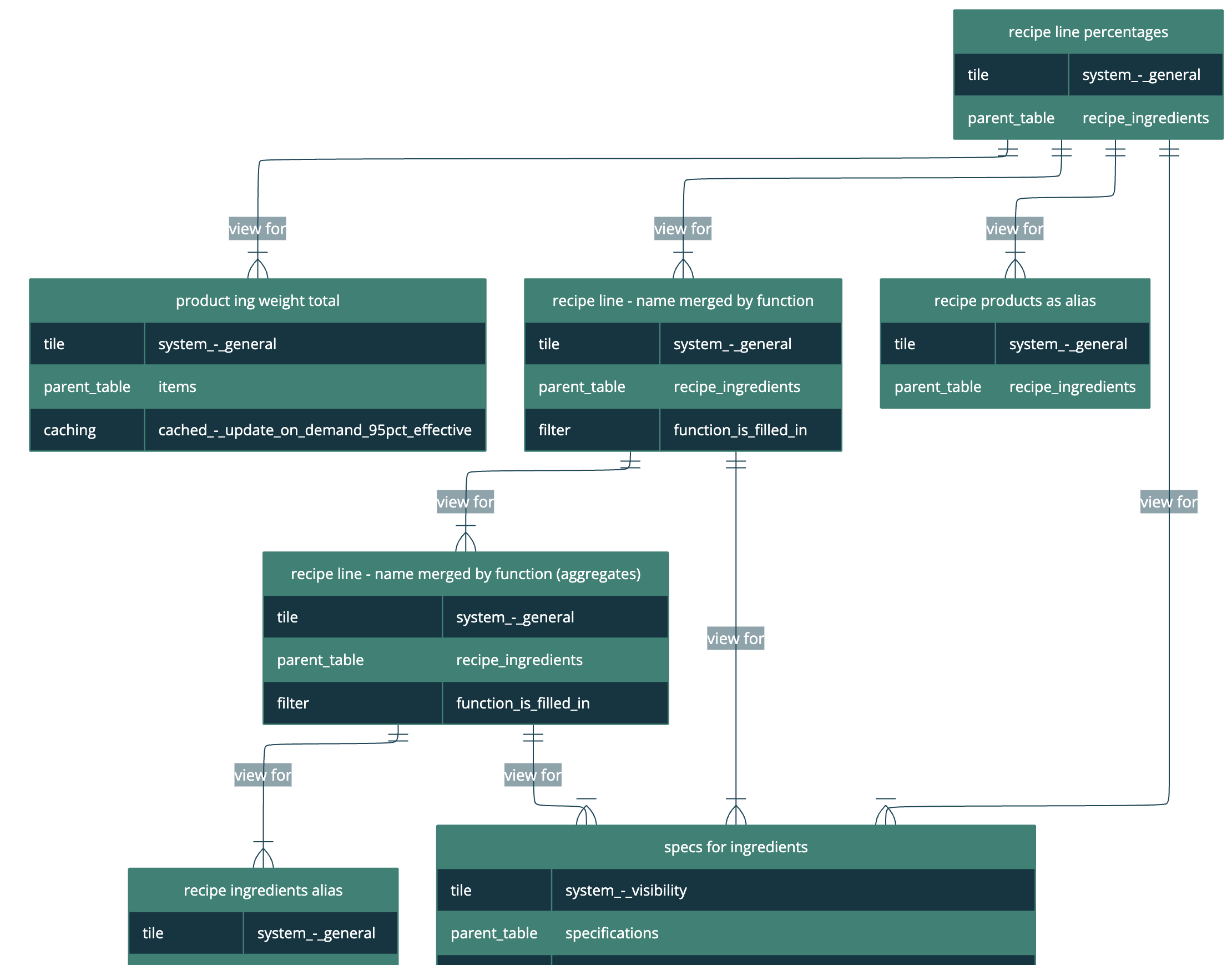
When we do start to create complex view structures, containing many views depending on each other, it helps to be able to visualise how everything’s connected. In the development interface, you can select any view or table and generate the chart of joins to or from it.
Here’s part of the structure of one of the views which uses the product ingredient weight total.
Other
The article we referenced at the start mentions a couple of other downsides of using chains of views. These ones though aren’t relevant for us.
- Writeable views. Agilebase has it’s own inline editing mode which effectively allows this functionality for any view.
- Row level security. Again, we have our own mechanism in-application for this - multi-tenanting
Summary
We think that the work explained above makes Agilebase one of the best platforms for database applications for businesses. To the robustness and performance capabilities of the PostgreSQL database, we add affordances to make the process of developing large, complex applications a lot easier.
We must emphasise however that the trade-offs and decisions talked about above are those which fit the intended use cases. Cases in which really complex applications need to be developed, but they are primarily internal business applications. Consumer facing applications working with big data for example may well have different needs.
Feedback
Was this page helpful?
Glad to hear it! Please tell us how we can improve.
Sorry to hear that. Please tell us how we can improve.